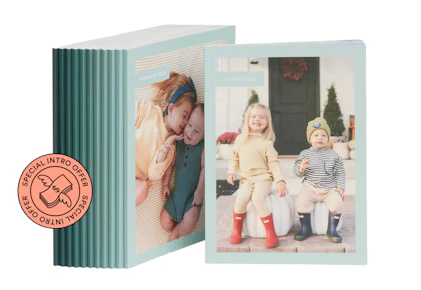
Try Chatbooks for just $1 and get your first 5×7 softcover Monthbook with 30–60 pages and free shipping!
After your first book, the subscription renews monthly for $15 with free shipping — and you can cancel anytime if your plans change.

Download the KCL app to add and redeem coupons in store


For iOS and Android users.
Get all the new deals and savings hacks straight to your inbox
Will be used in accordance with our Privacy Policy

How to get the deal:
-
Visit the Chatbooks website to activate the promotion.
-
Click on "Claim Offer" and choose the book cover colors.
-
Create an account with email and password.
-
Add your shipping and billing information, and pay $1 to complete your order.
You’ll then finish setting up your account on their website or in the free Chatbooks app, where you can easily select photos straight from your phone.
What is Chatbooks?
Chatbooks is an easy-to-use photo book service (available on web and mobile) that transforms your digital photos into beautiful printed albums. Simply upload pictures from your phone, social media, or cloud storage to create custom softcover or hardcover photo books in a variety of sizes.
With this offer, you’ll get 1 Monthbooks photo book for just $1, with free shipping!
The fine print:
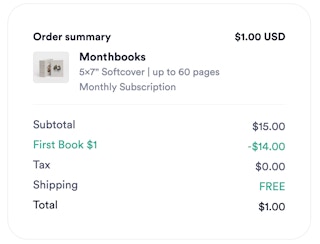
Bottom-line cost: $1 for your first Monthbooks photo books (plus tax where applicable).
When will I be charged? You'll be charged immediately once you place your order.
When will it ship? All Chatbooks orders take up to 5 business days to process, print, and bind. Once your photo book is ready to ship, delivery time will depend on the shipping method selected at checkout and your location.
Will I need to cancel? When you purchase the $1 photo book deal, you’ll be enrolled in a monthly subscription. After your first month, the plan will renew automatically at the regular price of $15 per month.
You can cancel your Chatbooks Monthbooks subscription at any time. The quickest and easiest way to cancel your subscription is within the Chatbooks app. Once your subscription is cancelled, you will have 90 days from the cancelation date to use any pending credits to print your books or we can extend your credits by reactivating your subscription.
Follow these steps to cancel your subscription from the Chatbooks App:
iOS How-To:
-
From the Home page screen, tap into the active subscription you want to cancel
-
Tap the "Settings" (gear icon) in the upper right corner
-
Tap "Manage subscription"
-
Tap "Cancel subscription" and choose your cancellation reason
-
Tap "Continue to cancel"
-
Review the next screen and tap "Continue to Cancel" again or you can "Change plan"
-
Tap "Confirm Cancelation" to finalize
Android How-To:
-
From "My Books" tab, tap on your active subscription
-
Tap the "Settings" (gear icon) in the upper right corner
-
Tap "Manage Subscription"
-
Tap "Cancel subscription" at the bottom of the screen
-
Select your cancelation reason
-
Tap "Continue to cancel"
-
Review the next screen and tap "Continue to cancel" again or you can "Change plan"
-
Tap "Confirm cancellation" to finalize
Get the best deals before they’re gone — follow KCL on Telegram. And if you're not couponing yet, you're missing out on FREE items. Download the KCL app now.