Get all the new deals and savings hacks straight to your inbox
Will be used in accordance with our Privacy Policy
If you’ve ever tried to keep up with the mountain of coupons out there — from the paper kind to multiple store apps — you know it can get confusing fast. You're juggling phone numbers, switching between apps mid-checkout, and half the time you’re just praying your coupon applied.
We’re here to say: Stop the madness!
This is where KCL Coupons and our secret weapon, 1-Clip™ Deals , step in to make it simple. With one easy barcode scan, you can apply all your digital manufacturer coupons at checkout straight from the KCL app.
No more flipping between apps, remembering phone numbers, or wondering if your coupon actually worked.
What are KCL Coupons?
KCL Coupons are digital manufacturer coupons you clip directly in the KCL app. The best part? They use the same universal coupon technology as platforms like Coupon24, meaning they’re not tied to any specific store's loyalty program.
Once you clip a coupon, simply scan one barcode at CVS checkout, and voila. All your coupons apply automatically. You don’t have to worry about store-specific clipping rules or whether you remembered to load them to your account.
Think of it this way — instead of handing over a stack of paper coupons or pulling up five different apps, you show just one barcode that has everything you clipped. The cashier scans it once, and you’re done. Coupons made simple.
How KCL Coupons Differ From Store Coupons:
-
One Barcode for All Coupons — Seriously. No printing, no multiple scans, and no more hunting through your phone.
-
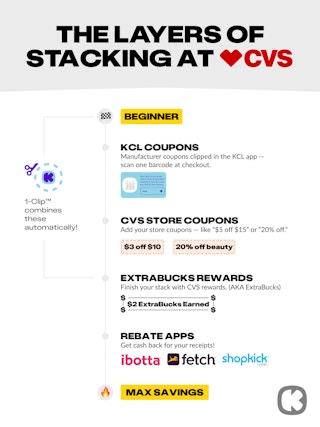
Stack with CVS Store Coupons and ExtraBucks — We love a good stack. Use KCL Coupons with your CVS store coupons and ExtraBucks for maximum savings on every trip.
-
Easy to Track — All those expiration dates and clipped coupons live in one happy place in the KCL app.
-
Flexible Use — They're currently accepted at CVS, and we’re adding more stores soon.
How to Get Started Using KCL Coupons at CVS
To start saving time and money with KCL Coupons at CVS, you'll need to set up the app first. Don't worry, it takes less than five minutes, and you only have to do it once. Here's exactly what to do:
Step 1: Download the KCL app.
Step 2: Create your account: Sign up for a new account or log in with your existing KCL account. This is where we safely store all your clipped coupons so you can access them from your phone. You’ll then verify your email address to continue.
Note: KCL Coupons are only available via the KCL App on your mobile device and are not supported on tablets or desktops.
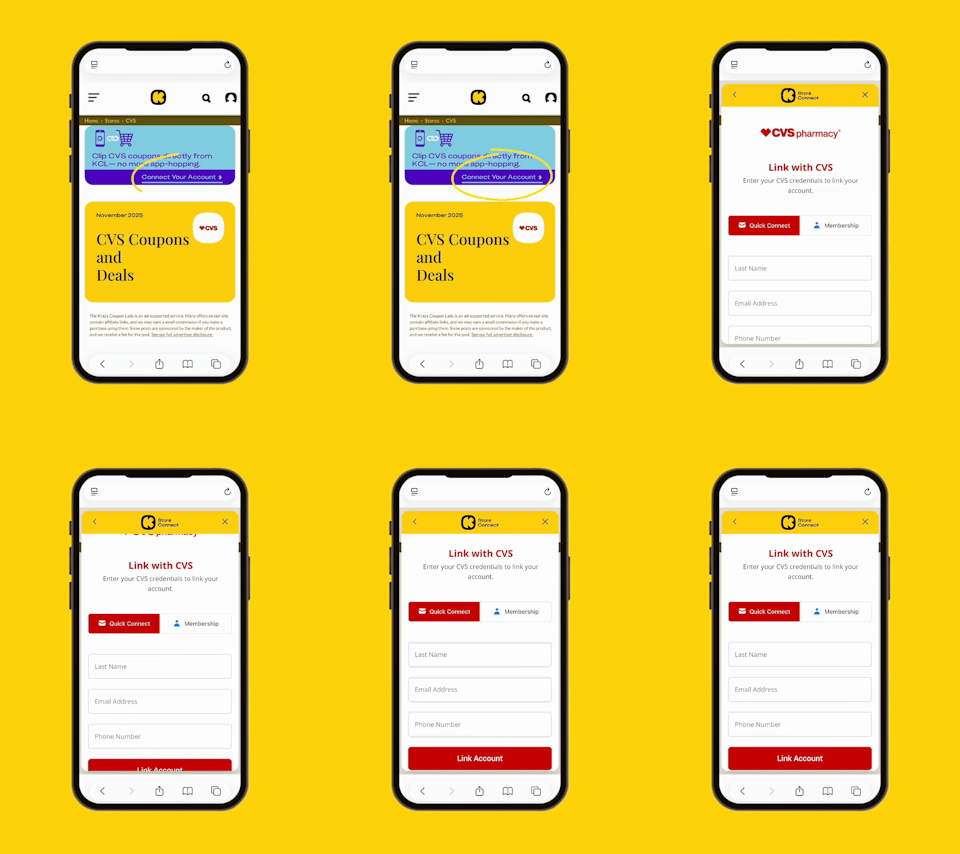
Step 3: Link your CVS account: Tap "Connect Your Account" to link to CVS. Linking your account unlocks 1-Clip™ Deals, which automatically combine KCL Coupons with CVS Store Coupons for faster, easier savings.
What are 1-Clip™ Deals?
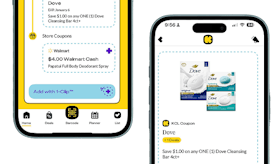
1-Clip™ Deals are our way of doing the heavy lifting for you. They automatically clip all your store loyalty coupons to get the lowest price on an item. Just look for the "Add with 1-Clip™" badge in the KCL app.
All of this is powered by our incredible Smart-Clip Coupon technology, the behind-the-scenes couponing magic. When you tap the "Add with 1-Clip™" button, the Smart-Clip tech automatically clips your coupons.
-
KCL Coupons go to your KCL app barcode.
-
CVS Store coupons get added to your synced CVS ExtraCare account.
At checkout, you'll just scan your KCL barcode and then your phone number. That's it.
KCL TIP: 1-Clip™ Deals only work when you've linked your CVS ExtraCare account to the KCL app. If you haven't linked yet, scroll up to the "Getting Started" section. It takes 30 seconds and unlocks this feature.
How to Clip KCL Coupons
Clipping KCL Coupons is just as easy as hitting like on an Insta post. There are two simple ways to do it, depending on where you are in the app:
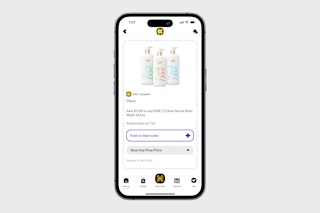
Option 1: Clip from a deal post.
When you're scrolling through CVS deals in the KCL app and spot a good one, just tap "Add to Barcode" on that deal. The coupon gets added to your barcode instantly. That's it. It’s now ready to scan at checkout.
This is perfect when you're planning your CVS trip and want to get coupons as you browse the week's best deals.
Option 2: Clip from the KCL Coupons section.
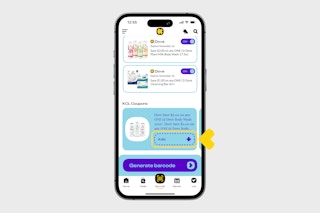
Want to see all available KCL coupons in one place? Head to the KCL Coupons tab in the app. From there, you can browse every available coupon and tap "Add" to clip the ones you want.
This method is great if you're doing a bigger shopping trip and want to load up on coupons for multiple categories like household items, snacks, personal care, and more.
KCL TIP: Clip coupons before you head to the store, but don't panic if you forget. As long as you clip them before you get to the checkout lane, you’re golden. Just make sure you're clipping while you still have service or Wi-Fi.
How to Redeem at Checkout
This is where KCL Coupons really shine. Instead of fumbling with your phone or trying to remember which app has which coupon, you only have one barcode to worry about. Here's the exact process for a smooth savings-filled checkout:
Step 1: Shop normally.
Grab everything on your list. There's no special app you need to keep open or coupons you need to activate while shopping. Just shop like the Krazy couponer you are.
Step 2: Tell the cashier you have digital manufacturer coupons.
When you get to the register, just let the cashier know you have digital manufacturer coupons to scan. This helps them know what to expect and ensures they scan your barcode before applying store discounts.
KCL TIP: If you are at self-checkout, you can skip this step. That said, KCL Coupons tend to work better at a register as opposed to the self-checkout lanes.
Step 3: Open the KCL app and go to "Barcode."
Tap the barcode icon in the app. This will pull up a single barcode that contains all the KCL Coupons you've clipped.
Step 4: Let the cashier scan your barcode.
Hold your phone screen toward the scanner, and let the cashier scan the barcode. You'll see the coupons apply to your transaction in real-time on the register screen. Cue the sweet sound of savings.
If you’re at self-checkout, you’ll scan your phone like you do a product UPC.
Step 5: THEN give your phone number for CVS Store Coupons and ExtraBucks.
After scanning the KCL barcode, provide your CVS ExtraCare phone number. This is when your Store Coupons, ExtraBucks rewards, and any CVS loyalty discounts will apply.
Important: You must scan the KCL barcode before your phone number; otherwise, coupons may not apply correctly!
How to Maximize Savings at CVS With KCL Coupons
The magic happens when you stack everything CVS allows, all in one trip. This is when you combine KCL Coupons, CVS Store Coupons, ExtraBucks, and sale prices for maximum savings. And with 1-Clip™ Deals, a lot of this stacking happens automatically.
Here's how stacking looks in action:
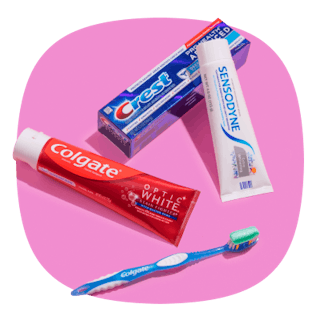
Let's say you're buying Colgate toothpaste, which is regularly $5.99. When you check the KCL app, you see it has the following coupons available:
-
$2 off KCL Coupon (manufacturer coupon)
-
$1 off CVS Store Coupon (digital store coupon)
-
$2 ExtraBucks Reward (prints when you buy, use on next trip)
-
On sale for $4.99 this week
You tap "Add with 1-Clip™" in the app, and here's what happens:
-
The sale price brings it down to $4.99.
-
The KCL Coupon takes off another $2 (now $2.99).
-
The CVS Store Coupon takes off another $1 (now $1.99).
-
You'll receive $2 in ExtraBucks to use on your next purchase.
Your out-of-pocket cost: $1.99 for a $5.99 toothpaste. And you still have $2 in ExtraBucks for next time. That's basically free toothpaste, people.
Instead of clipping two different coupons in separate apps, you tapped once and saved big. That's the power of Smart-Clip Coupons and ninja-skilled stacking.
FAQs
How many KCL Coupons can I use per transaction?
As many as you've clipped. Since there’s typically one coupon per product, if you're buying five different items and you've clipped five different KCL Coupons, all five will apply when you scan the barcode. There's no arbitrary limit like "four coupons per transaction," the way some stores restrict paper coupons.
If you have additional coupons clipped that you don’t want to redeem, you can toggle them off in the KCL app so you can redeem only the coupons you wish in that transaction.
Will one clipped KCL Coupon work on multiples of the same item? No. Each KCL Coupon applies to one item, so you’ll need one coupon per product if you’re buying multiples. Store coupons sometimes cover more than one, but CVS will note that in the offer details.
Can I stack KCL Coupons with paper coupons?
No. You can't stack KCL Coupons with paper manufacturer coupons on the same item. CVS's coupon policy doesn't allow two manufacturer coupons (digital or paper) on one product. However, remember you can stack a KCL Coupon with a CVS Store Coupon and ExtraBucks. Those are considered different types of discounts.
What if I forgot to clip before checking out?
You can clip coupons anytime before you get to checkout. As long as you add them to your barcode before the cashier scans it, you're good. If you've already checked out, you won't be able to go back and apply them retroactively. Make it a habit to browse deals and clip coupons while you're planning your trip or even while you're walking around the store.
Do KCL Coupons work at all CVS locations?
Yes. KCL Coupons work at every CVS store that accepts digital manufacturer coupons (which is all of them, as they use the standard 8112 coupon technology). Whether you're shopping at your neighborhood CVS or one across the country, the coupons will scan the same way. That said, they tend to work better at a register as opposed to the self-checkout lanes
Do KCL Coupons expire?
Yes. Each coupon has its own expiration date, which you can see in the app when you clip it. The great news? Expired coupons disappear from your barcode automatically, so you don't have to worry about accidentally trying to use an old one. The app does the housekeeping for you.
What if a coupon doesn’t scan?
First, politely ask the cashier to try scanning again. Sometimes it's just a glitch with the scanner. Always make sure the item you're buying matches the coupon exactly (right size, etc.). Also, double-check that you scanned the KCL barcode before entering your CVS ExtraCare phone number. If you're scanning with the barcode, try switching to the QR code. If it still won't work, the cashier can manually enter the coupon code.
I linked my CVS account. Now what?
Once linked, CVS Store Coupons will automatically appear in your KCL app, and you'll immediately start seeing 1-Clip™ Deals that pair manufacturer and store coupons in one tap. You don't need to visit CVS.com or their app separately to clip digital coupons anymore — the app pulls them in for you.
And just a quick note: Redemption still happens through CVS at checkout with your ExtraCare number. The KCL app handles only the clipping part.
Start saving with KCL Coupons.
With KCL Coupons at CVS, saving is simple: clip in the app, scan your barcode, and stack your savings. No more app-hopping or printing paper coupons. Just one barcode, one scan, and you're done. Happy Couponing!
You May Also Be Interested In:
Download the KCL app to add and redeem coupons in store


For iOS and Android users.
Get all the new deals and savings hacks straight to your inbox
Will be used in accordance with our Privacy Policy