Get all the new deals and savings hacks straight to your inbox
Will be used in accordance with our Privacy Policy
If couponing feels complicated these days, it's not just you! In fact, our 2025 State of Couponing Survey showed that the biggest headache for couponers is the sheer amount of apps and options out there. We. Get. It. Juggling our app, store apps, and every other app, just to find, clip, and scan coupons is a lot.
That's why we're excited to introduce a new feature in our revamped app that will officially make KCL your one-stop shop for couponing: 1-Clip™ Deals.
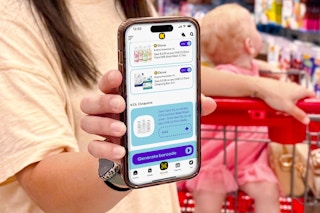
Thanks to this brand-new magical feature (which you'll find exclusively in our KCL app), it takes one single tap to add KCL Coupons and store digital coupons — all at the same time. Find the best 1-Clip™ Deals in our app right here. Then just head to the store, shop, and check out. Done and done!
Here's everything you need to know so you can stop app-hopping and start saving with 1-Clip™.
3 Steps to Get Started
To start saving time and money with 1-Clip™ Deals, here are three easy steps to get started:
1. Get the KCL app. You'll need it to clip 1-Clip™ Deals.
2. Link your store accounts. Just start with a few (you can always add more later). Look for the"Connect Your Account" button.
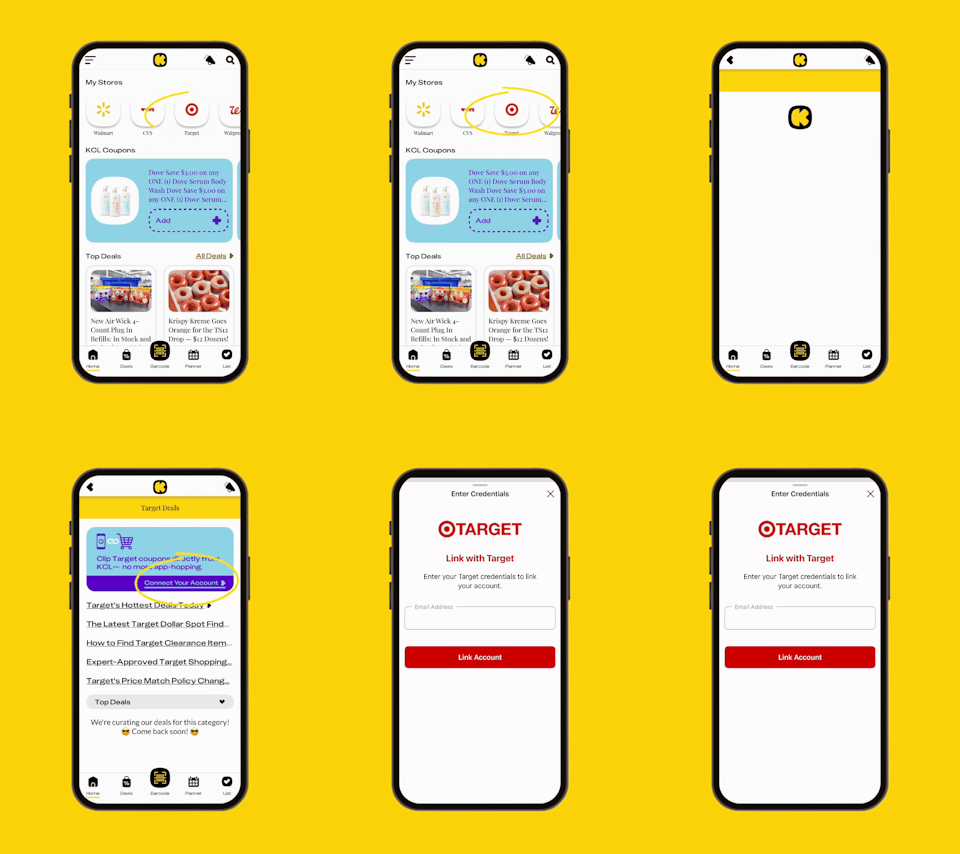
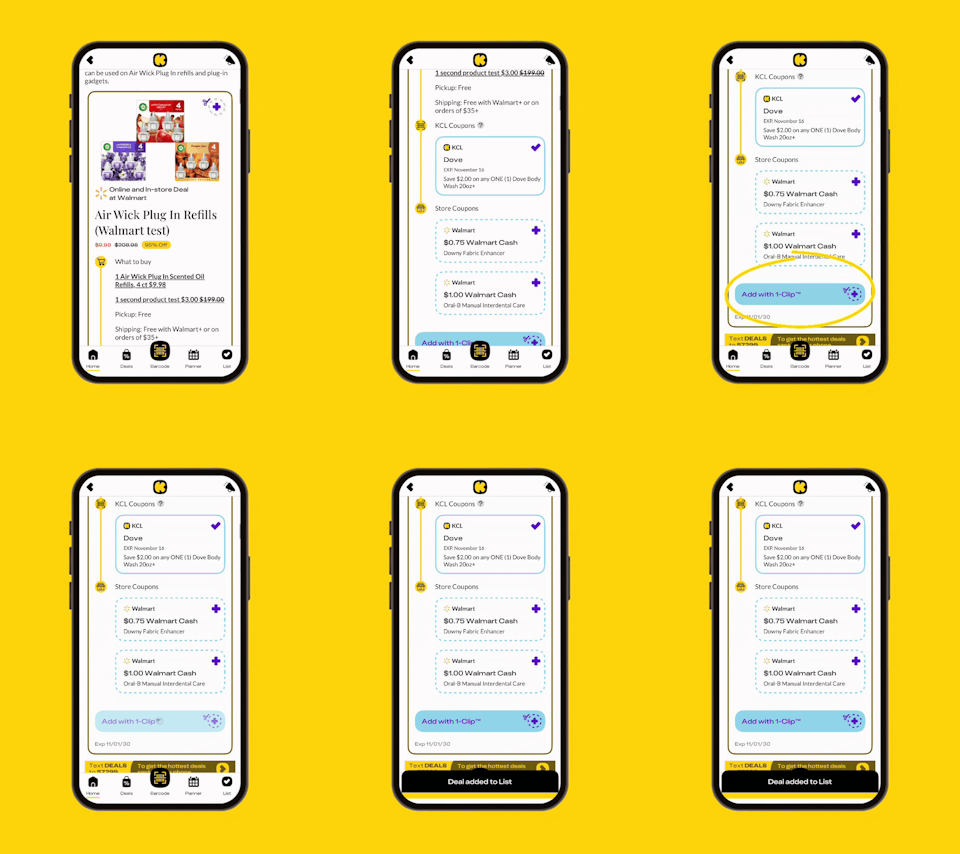
3. Start clipping whenever you see the 1-Clip™ badge.
What are 1-Clip™ Deals?
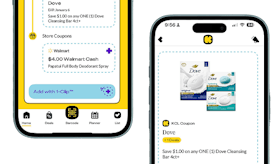
Think of a 1-Clip™ Deal as your personal couponing assistant. It automatically clips all the coupons you need to get the lowest price on an item. Look for the "Add with 1-Clip™" badge in the KCL app.
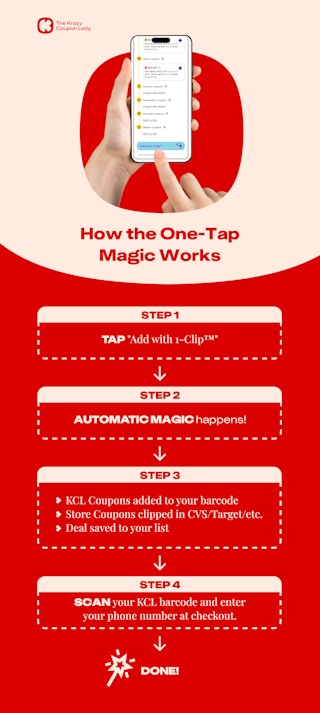
These deals use Smart-Clip Coupon technology. Think of it as behind-the-scenes coupon magic. When you tap the "Add with 1-Clip™" button, Smart-Clip automatically sorts your coupons. KCL Coupons go to your KCL app barcode, and store coupons get added to your synced store account.
At checkout, you'll just scan your KCL barcode and enter your phone number. That's it!
Here's why this is a game-changer: Many of our editor-found deals require you to use multiple coupons together to get rock bottom prices. Before, you had to find and clip each coupon separately. Now, one tap clips everything you need automatically — no tracking, no extra steps, just savings.
KCL Coupons, Store Coupons, and 1-Clip™: Let’s Break It Down
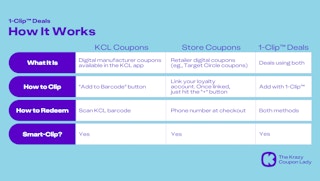
We just threw a lot at you: KCL Coupons, store coupons, 1-Clip™ Deals. Here's a quick and clean breakdown:
KCL Coupons:
-
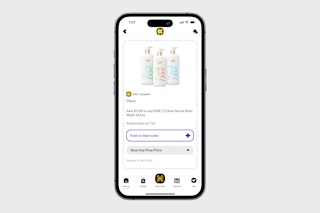
What They Are: KCL-exclusive digital manufacturer coupons that you clip in the KCL app.
-
How to Find: Look for the KCL Coupon label.
-
How to Clip: Just hit the "Add" button.
-
How to Redeem: Hit "Barcode" in the KCL app and then scan it at checkout.
-
Example: $2 off Dove body wash.
Store Coupons:
-
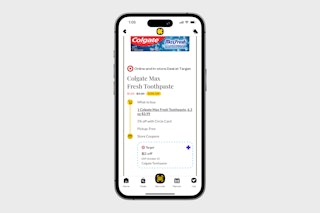
What They Are: Digital coupons from stores (CVS, Target, etc.): Think Target Circle offers and CVS app coupons and ExtraBucks offers.
-
How to Find: Look for the retailer logo next to the coupon.
-
How to Clip: Just hit the plus sign on the deal.
-
How to Redeem: Link your store account to your KCL account. That way, when you hit the "+" sign, they go straight to your store account so you can just enter your phone number at checkout.
-
Example: $2 off Colgate toothpaste with Target Circle.
1-Clip™ Deals:
-
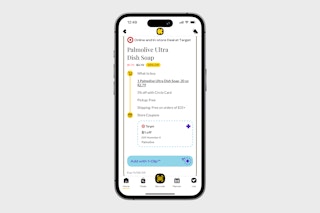
What They Are: Complete deals that bring together KCL Coupons and Store Coupons.
-
How to Find: Look for the "Add with 1-Clip ™" badge.
-
How to Redeem: Hit that "Add" button. That's it. At the store, scan your KCL barcode and the store app bar code (or enter your phone number).
-
Why It Matters: One tap clips everything automatically.
Example: A deal using a $2 KCL Coupon + a $0.75 store offer + a $1 store offer.
KCL TIP: You only have to link your store account once to use 1-Clip™ Deals for that store. Easy peasy!
How to Find 1-Clip™ Deals
1-Clip™ Deals are everywhere on KCL, on our homepage, on individual store pages, and in all the categories. While you'll see them on our desktop site, you'll be prompted to download our app (which you absolutely should do) in order to actually use them.
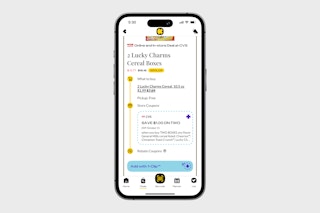
Right now you'll see 1-Clip™ Deals from CVS, Target, Walgreens, and Kroger, with more on the way!
1-Clip™ Deals vs. The Old Way
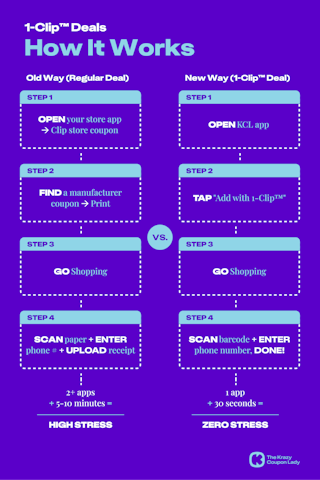
If you've been clipping coupons for years, you probably have your own methods. And so did we. But we're about to save you SO MUCH time. Here's how the old way of couponing compares to the new way with 1-Clip™ Deals.
FAQs
Do I need to link my store account?
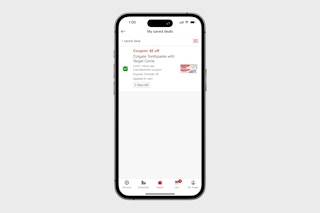
Yes, here's how to do that. For every store where you want to use 1-Clip™ Deals, you'll need to link that store's account so that we can clip the store coupons for you. It takes about 30 seconds to link each account. Have your store account email and passwords ready. Once you've linked them, you're done, and all store coupons in our 1-Clip™ Deals will go straight to your store account. Here's what that looks like in a Target account after hitting "Add with 1-Clip™" on a Target deal:
What if I already clipped some coupons manually? Great question! If you clipped a coupon anywhere on the KCL app or website (outside of a 1-Clip™ deal), it should appear as "clipped" when you view it in our app. If you clipped a coupon with a store's app, it will already be in your loyalty account. When you use 1-Clip™, it only adds coupons you haven't clipped yet to your account. It won’t duplicate or change anything you have already done.
Can I remove coupons after adding a 1-Clip™ Deal? Totally, just go to your List in the KCL app. Find the 1-Clip™ Deal you want to remove, then tap the black "x."
Do 1-Clip™ Deals expire? Yes, they do. Each coupon you clip with a 1-Clip™ Deal has its own expiration date set by the brand or the store. You'll see the exact expiration date right below the "Add with 1-Clip™" button.
What if the deal doesn't work at checkout? First, don’t panic! If the KCL barcode isn’t scanning, there's an alternate coupon code or a QR code available on your app screen that the cashier can enter. If the coupon's working but the discount isn't coming off, double-check the coupon's fine print and make sure you're buying the exact product and size that the coupon applies to.
Are 1-Clip™ Deals better than regular deals? They are, definitely. When you add a 1-Clip™ Deal to your List in the KCL app, all coupons are clipped automatically. Huge time saver!
Can I still use deals that aren't 1-Clip™? Yes, of course! You can still clip individual KCL coupons and add store coupons yourself. If you have paper coupons, just use those at checkout as you usually do. Remember, though, if you try to use your 1-Clip™ coupons along with paper or other digital coupons, most coupons have rules attached to them about using multiple coupons on the same item.
Do I still need other coupon apps? For the time being, you'll still need to use separate cash-back rebate apps, like Ibotta or Fetch. But we're working on getting those into 1-Clip™ Deals too. Stay tuned!
It's time to get started.
If you've been on the fence about couponing because it just takes too much time, 1-Clip™ Deals handle some of the biggest couponing headaches for you. No more hunting through different apps or printing coupons to get the lowest price. Download the KCL app today and start saving in seconds, not minutes!
You Might Also Be Interested In:
Download the KCL app to add and redeem coupons in store


For iOS and Android users.
Get all the new deals and savings hacks straight to your inbox
Will be used in accordance with our Privacy Policy