Get all the new deals and savings hacks straight to your inbox
Will be used in accordance with our Privacy Policy
If you’re over bouncing back and forth between the CVS app and The Krazy Coupon Lady (KCL) app just to stack your savings, stop right now — there’s a way better way.
Link your CVS ExtraCare account to the KCL app once , and boom: everything syncs like magic. Coupons auto-clip, 1-Clip™ Deals unlock, and checking out at CVS becomes easier than your morning Starbucks order. Seriously — this takes two minutes, and once it’s done, you’ll wonder why you didn’t do it sooner.
Link once, save always. Below, we’ll show you exactly how to link your CVS account and start couponing like a pro at CVS with zero extra effort.
What Does Linking Your CVS Account Do for You?
Short Answer: Everything
-
Auto-clip Store Coupons right from KCL. You'll never need to open the CVS app again to clip digital coupons. When you clip a CVS Store Coupon in the KCL app, it automatically clips to your ExtraCare account.
-
Unlock 1-Clip™ Deals at CVS. This is where the magic happens. 1-Clip™ Deals automatically clips both KCL Coupons (digital manufacturer coupons) and CVS Store Coupons with a single tap. That’s right, friends, one and done. No tracking, no extra steps.
-
Save time on every CVS trip. Instead of juggling multiple apps before you shop, browse deals and clip everything in one place. Your next trip to CVS is going to be so fast, you might need a second hobby.
By connecting your accounts through our secure connection, KCL can clip those Store Coupons on your behalf . Once you're linked, you'll be ready to stack both KCL Coupons and Store Coupons like a pro.
What You’ll Need to Link Your CVS Account to KCL
You’re almost there. Just grab these two things:
-
The KCL app downloaded on your phone
-
Your CVS ExtraCare account login (that’s the email and password you use for CVS.com)
Don’t have a CVS account yet? Create one here.
How to Link Your CVS Account: Step-by-Step
Ready to connect? You can do this right now or when you find a deal you love.
Step 1: Open the KCL app.
Launch the KCL app on your phone. If you haven't created a KCL account yet, you'll need to sign up first (it's free and takes about 30 seconds). Already have an account? Just make sure you're logged in before moving to the next step.
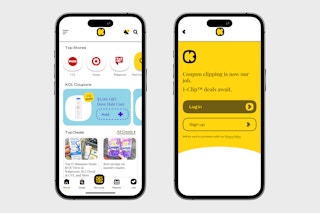
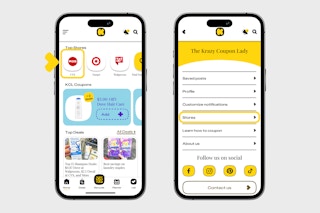
Step 2: Tap the CVS icon.
Find the CVS store icon on your homescreen, or tap the three lines in the top left corner, go to "Stores," and find CVS.
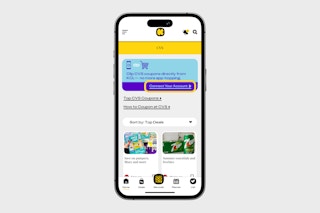
Step 3: Hit "Connect Your Account."
Select "Connect Your Account" at the top.
Step 4: Sign in to CVS.
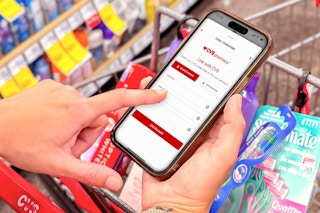
Enter the email address and password tied to your CVS ExtraCare account, then tap "Link Account."
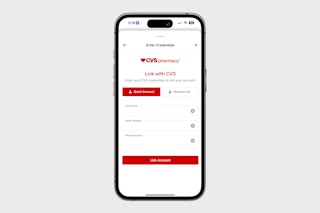
Step 5: Approve the Connection
If a CVS authorization screen pops up, choose "Allow" or "Authorize" so KCL can securely link your account and clip Store Coupons for you.
Step 6: You're linked!
The screen will refresh, and you’ll see the CVS deals page with your account connected.
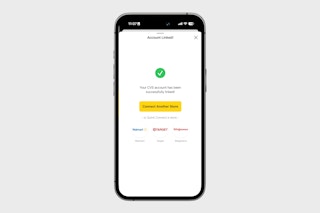
That’s it! From now on, your Store Coupons will automatically clip, your 1-Clip™ Deals will be instant, and you'll never have to switch apps to save money again!
How to Verify Your Account Is Linked
Once your account is connected, the blue "Connect your account" banner will no longer appear at the top of the store page. You can also try adding a 1-Clip™ Deal, and it should clip instantly.
Troubleshooting Common Issues
Here are a couple of quick fixes if you run into trouble. We'll add more solutions as new issues come up.
Problem: "Invalid email or password"
-
Make sure you’re using your CVS.com login, not your KCL login.
-
Reset your password at CVS.com/forgot-password.
-
Watch for typos or extra spaces when entering your info.
Problem: "Coupons not auto-clipping"
-
Confirm that CVS shows as Connected under "Linked Stores."
-
Try unlinking, then relinking your account — the process only takes a minute.
-
If you recently changed your CVS password, you may need to re-enter your login details in the KCL app.
What Happens After Linking
Once your CVS ExtraCare account is linked to KCL, here's what changes (and what stays the same).
What Changes:
-
Store Coupons clip automatically. When you tap a CVS Store Coupon in the KCL app, it instantly clips to your CVS ExtraCare account, no need to open the CVS app at all.
-
1-Clip™ Deals work seamlessly. When you add a 1-Clip™ Deal to your list, both the KCL Coupon (manufacturer coupon) and the CVS Store Coupon clip automatically. One tap does it all.
-
Coupons appear in both places. Any Store Coupon you clip in KCL will also show up in the CVS app and on CVS.com. They sync automatically.
What Doesn't Change:
-
You still scan your KCL barcode for KCL Coupons. KCL Coupons (manufacturer coupons) are still redeemed by scanning the barcode in your KCL app at checkout. Learn how to use KCL Coupons at CVS .
-
ExtraBucks and CVS rewards work exactly the same. Your ExtraBucks still print on receipts or load to your card (whichever preference you've selected), expire on the same schedule, and work the same way at checkout.
-
You still enter your phone number at checkout. To apply Store Coupons and ExtraBucks at the register, you still need to provide your CVS ExtraCare phone number.
-
You can still use the CVS app if you really want to. Linking doesn't modify your CVS account settings, payment methods, or personal information. You can still browse or clip in the CVS app if that’s what you prefer. The KCL app and 1-Clip™ simply allow KCL to clip coupons on your behalf.
FAQs
Is it safe to link my CVS account? Yes! KCL uses encrypted, secure connections. We never store your CVS password or personal data.
Can I link multiple CVS accounts? Nope, it’s one CVS ExtraCare account per KCL profile.
Do I need to keep the CVS app installed? No, you can delete it if you’d like. KCL now handles all the clipping magic for you.
What if CVS changes my password? You’ll just need to quickly relink your account in KCL with your new password.
Will linking affect my ExtraBucks or rewards? No. Your ExtraBucks and rewards work exactly the same. You'll still earn and spend them just like before.
You're linked — now what?
Now that your CVS account is connected, you’re ready to experience effortless couponing. Store Coupons will clip automatically, 1-Clip™ Deals will work instantly, and your next CVS trip will be faster than ever.
You May Also Be Interested In:
Download the KCL app to add and redeem coupons in store
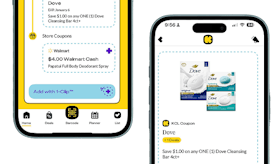


For iOS and Android users.
Get all the new deals and savings hacks straight to your inbox
Will be used in accordance with our Privacy Policy