Get all the new deals and savings hacks straight to your inbox
Will be used in accordance with our Privacy Policy
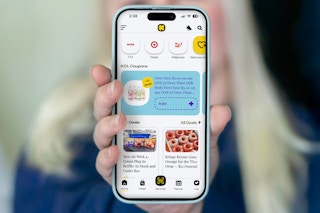
The Krazy Coupon Lady has been working on something big — an updated app featuring new, game-changing technology that clips store loyalty offers and manufacturer coupons for the first time ever directly in our app . No more hunting down product offers in one app and store offers in another. They're all right here.
Yes, this app ends all the little headaches that often come with couponing: the app-hopping, the hunt for coupons (and remembering to clip them), and that checkout panic moment. Our new app is truly couponing made simple.
What's on this page:
What's Changing
Here’s how our revolutionary 1-Clip™ technology makes the KCL app the only couponing app you’ll need.
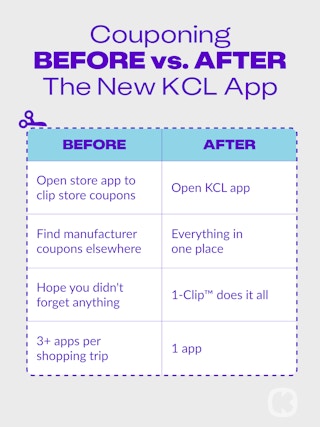
Key Features at a Glance
Here’s what we’ve added for you:
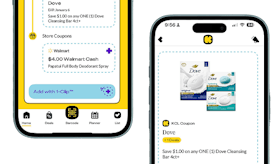
KCL Coupons: These are product-specific offers. Think deals like, "$2 off 1 Dove Body Wash." When you clip them in the app, they'll go to your KCL app barcode which you can scan at checkout. Right now, these KCL Coupons work at CVS, but expect other stores to start accepting them in the coming months.
Store Coupons: These are store-specific coupons. Think Target Circle offers or CVS ExtraBucks offers. Once you've linked your store loyalty accounts in the KCL app, clipping these coupons automatically sends them straight to your store account. So at checkout, when you enter your phone number, they'll be applied to your order. Which brings us to...
Linked Store Accounts: In our app, you can now link your store accounts in seconds. We explain step-by-step here. Once your store loyalty accounts are linked to our app, you can use the KCL app to clip store-specific coupons and offers.
1-Clip™ Deals: This is what ties it all together. In our app, you'll find deals with an "Add with 1-Clip™ badge. Tap that badge, and all the KCL Coupons and Store Coupons needed to get the deal will be applied. Done and done. Looking for 1-Clip™ Deals? Check out our roundup of the best ones this week.
How to Get Started
It just takes three steps to start couponing faster.
Step 1: Download or update the KCL app.
-
It all starts with our app. To get it, scan our QR code here or find us in the App Store or Google Play.
-
If you already have our app (you smart saver, you), make sure you have the latest version. This should happen automatically, but if it hasn't, you can update apps manually on your phone by going to the app store (for iOS or Android), tapping your profile icon, and then hitting "update" next to the KCL app.
Step 2: Link your store accounts.
-
This is a one-time setup process and takes about two minutes per store.
Step 3: Start saving.
-
Look for 1-Clip™ Deals.
-
Tap the 1-Clip™ badge to clip all the right coupons. KCL Coupons go to your KCL app barcode, while store offers go to your store account.
-
At checkout, scan the KCL app barcode (to apply the KCL Coupons) and provide your phone number (to apply the Store Coupons).
Quick Answers
Still have questions about how it all works? No problem.
Do I need to link my store accounts?
Yes, this is required if you want the Store Coupons in our 1-Clip™ deals to auto-clip to your loyalty account. Here's how to link your accounts. If you don't link your accounts, you can still clip KCL Coupons in our app, but you'll have to open your store apps separately to add Store Coupons.
Which stores are included?
Right now, KCL Coupons work at CVS (and more retailers will roll them out soon). But when it comes to linking your store accounts to clip Store Coupons, we have dozens of options, including CVS, Walgreens, Target, Walmart, regional grocery stores, and more. In the app, tap the store icons and then follow the instructions to link your loyalty accounts.
What's the difference between KCL Coupons and Store Coupons?
KCL Coupons are manufacturer coupons for specific brands or products. To use them, you'll clip them in the KCL app and then scan the KCL app barcode at checkout. Store Coupons are retailer coupons valid only at the store they're from. To use them, you can clip them in the KCL app (if you've linked your store account) and then enter your phone number at checkout.
What are 1-Clip™ Deals?
These are deals that automatically clip all coupons (KCL Coupons and Store Coupons) with one tap. Learn more here.
Can I still use paper coupons?
Yes, but the KCL app is an easier option. Just keep in mind that if you have a manufacturer paper coupon and also clip the same coupon in our app, you can't use both on the same purchase.
What if I have the old app?
Just update to the latest version; your account and saved deals are still there.
If you don't have our app yet, download it here .
You May Also Be Interested In:
Download the KCL app to add and redeem coupons in store


For iOS and Android users.
Get all the new deals and savings hacks straight to your inbox
Will be used in accordance with our Privacy Policy