Get all the new deals and savings hacks straight to your inbox
Will be used in accordance with our Privacy Policy
Let’s be real — there’s no such thing as money for nothing. If an app promises you rent money while it runs in the background, it’s lying to you. But there are some passive-income apps out there that are worth your time and do actually throw a few bucks your way for doing very little.
Here's what we learned when we tested seven different passive-income apps, including how much we made, how each app works, the catch (because there's always a catch), and who should bother downloading each app.
Want more? Try our favorite rebate and cash-back apps and our new and improved KCL app too.
What's on this page:
Passive-Income Apps, Tested by Our Editors
Download these apps:
-
SurveySavvy — Install it, forget it, and you'll earn about $3 per device per month.
-
Upside — Two quick taps before you pump gas or pay for groceries, and you'll get real cash back.
-
MobileXpression — Truly hands-off; earn $5 in the first week, then a slow weekly trickle while you do nothing.
Skip these apps:
-
KashKick — Tons of rejected surveys and long offers for a few bucks.
-
Steps — While a million steps sounds epic, you’re literally only making 10 cents a day for 10,000 steps.
Realistic Earnings: $10 - $35 a month for roughly 5 - 12 minutes a week.
Best Combo: Upside + SurveySavvy + MobileXpression. Upside knocks a little off gas and meals; the other two sit there and pay you a tiny bit for just existing. Low effort, small but steady wins.

Specific Passive-Income App Info
1. SavvyConnect
What It Is: Install the SavvyConnect app on your phone or computer and earn money as it runs in the background tracking your web and app usage for market research purposes.
How Much We Made: $6 in one month ($3 per device), guaranteed.
Time Investment: 5 - 10 minutes to install on two devices, then it’s automatic; just leave it alone.
How It Works: While it's a true set-it-and-forget-it app, know that you’re trading data for dollars. They ask that you keep it connected for seven days or more a month, and you’ll earn $3 per device, paid by mailed check, in exchange for sharing anonymized browsing and app-usage data.
The Catch: You must stay active and connected. If the app goes inactive (VPN/private mode, connection drop), you won’t earn for that time period.
Best For: Anyone who doesn't mind sharing data in exchange for a steady monthly payout.
KCL Verdict: Worth it. It’s truly passive money and backed by a reputable company, Luth Research.
2. Upside
What It Is: Upside is a free app that gives you cash back on gas, groceries, and dining at participating stores, gas stations, and restaurants.
How Much We Made: $0.10 - $0.11 per gallon on average and 8% back on dining and grocery.
Time Investment: 7 - 10 minutes for initial setup; then 30 - 60 seconds if you need to upload a receipt.
How It Works: You claim an in-app offer for a specific store, gas station, or restaurant. Then you pay with a normal card or the in-app wallet, then wait for Upside to verify and credit you. You can cash out to your bank, PayPal, or gift cards within the app. A $1 fee may apply if you withdraw less than $15.
The Catch: Deals vary from location to location, change frequently, and can be a little hard to follow. One user I spoke with gave a great tip for getting cash back on gas: he said to “always claim the exact station and tap Directions so you don’t accidentally fuel at the wrong gas station.”
Best For: If you’re already driving a lot (commuters or delivery). Ten gallons with a $0.15 per gallon offer is $1.50 back which is decent. But if you won’t remember to claim and upload a receipt when required, you won’t like the app.
KCL Verdict: Worth it. Decent payouts for the time required to make it happen.
3. MobileXpression
What It Is: MobileXpression is a long-running research panel (Comscore) that rewards you for keeping its mobile app/VPN running in the background.
How Much We Made: $5 in the first week. Average about $10 per month, completely passive, paid via gift cards.
Time Investment: 5 - 10 minutes to install and set up.
How It Works: Install the MobileXpression app, create an account, and allow the required permissions so it can measure your phone’s internet/app usage in the background. Then keep it running while you use your phone normally. As the app stays active, you accrue points (plus a typical $5 welcome reward after the first week for new U.S. members). You can then redeem accumulated points for eGift cards in the in-app rewards catalog.
The Catch: After the initial week one gift card, many users report roughly $1 - $1.50 per week in value, so it’s a slow earner.
Best For: Users that are okay with sharing their device and web usage. Anyone looking for a truly passive, hands-off slow earner every month.
KCL Verdict: Worth it. If you don’t mind a research app riding shotgun on your phone, it’s an easy $5 the first week and a slow drip of gift cards after that.
4. Pogo
What It Is: The Pogo app links to your credit and debit cards and rewards you for your purchase data as well as auto-detects email e-receipts and location check-ins.
How Much We Made: $7 in one month.
Time Investment: 10 minutes to get your accounts synced up.
How It Works: Pogo lets you link your credit and debit cards via Plaid, and they pull transaction data from your linked accounts to award you points. You can also link your email accounts, and they’ll give you rewards for your e-receipts from Amazon, Target, Walmart, and many others. Plus, there are optional surveys that let you earn money. Cash out via PayPal or gift cards.
The Catch: You’re being paid for your data, so be sure to only link what you're comfortable sharing.
Best For: Anyone who shops online regularly and has a lot of e-receipts, anyone who is okay with sharing their credit and debit card purchases.
KCL Verdict: Maybe worth it. If you're okay sharing credit card data for what amounts to coffee money each month.
5. Nielsen Computer & Mobile Panel
What It Is: Nielsen Computer & Mobile Panel is a legitimate, set-and-forget panel that pays small rewards for letting Nielsen measure how your phone and/or computer are used.
How Much We Made: About $3 - $5 per month on mobile ($36 - $60 per year). The computer side is sweepstakes-based, so $0 is guaranteed there.
Time Investment: 5 - 8 minutes to set up, double that if you do it on both your phone and computer. After that, they do the rest.
How It Works: Install the Nielsen app/desktop helper, consent to passive measurement, and let it run in the background. You earn points automatically on mobile (redeemable for gift cards and cash equivalents) and sweepstakes entries on your personal computer.
The Catch: Small payouts, and it’s all about data collection. You’re trading information about how you use your device and the internet for rewards.
Best For: People who want a 100% passive option and are comfortable with the privacy trade-off.
KCL Verdict: Maybe worth it. If you’re cool with the data trade, it's a good option as you set it up once, forget it, and let a few bucks a month quietly roll in.
6. KashKick
What It Is: KashKick is a semi-passive app where you have to complete small tasks like surveys, play games, or test out different apps to earn cash. Use your referral link to have others sign up, and you’ll earn a small bonus without doing anything else.
How Much We Made: $10 in the first month.
Time Investment: Expect 5 - 20 minutes per survey, while higher payout game/app offers can take an hour to hit the milestone.
How It Works: You tap an offer, then complete the specific requirement (finish a survey, reach a game level, start a trial) with tracking enabled so KashKick can verify it. Once verified, the reward posts to your cash balance, sometimes instantly, sometimes after a short delay. Hit $10, and you can cash out with PayPal.
The Catch: You’ll be disqualified for many of the surveys, and some of the game offers take forever to compete. I played one game for 15 minutes and finally had to quit before I could reach the level I needed to get to in order to earn anything.
Best For: Patient tinkerers and gamers who want the occasional $15 - $25 payouts.
KCL Verdict: Skip it. It’s just not passive enough, and the passive referral link is not enough motivation for what it could potentially bring in.
7. Steps
What It Is: The Steps app pays you cash for walking around. The more steps you take, the more you make.
How Much We Made: 250,000 steps in a month, which came out to $2.50.
Time Investment: Five minutes to set up, then the app did the rest.
How It Works: You sync the app with your Health app on your iPhone, and it tracks your daily steps. You also have opportunities to earn extra steps by watching ads. One watched ad equals 2,000 - 3,000 steps, so they add up pretty quickly.
The Catch: Minimum $10 cashout after you reach 1 million steps. But keep in mind that steps accumulate quicker when you watch video ads. Also, as of this writing it’s only available for iOS, and an Amazon gift card is the only redemption method.
Best For: Anyone who's focusing on their health (they also have a Healthy News Feed) and would like to earn a little extra money.
KCL Verdict: Skip it. It’s nothing more than a nudge to walk. While it was kind of fun to track our journey to a million steps, let’s be honest, $10 for a million steps is kind of silly. For perspective, if you walk 10,000 steps in a day, that equates to a dime of earnings.
Bonus: KCL App
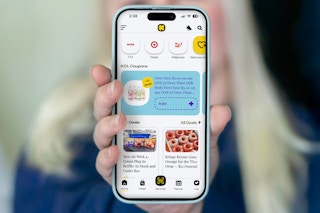
The Krazy Coupon Lady has been working on an updated KCL app featuring game-changing technology that clips store loyalty offers and manufacturer coupons for the first time ever directly in our app . No more hunting down product offers in one app and store offers in another. They're all right there.
Learn how to link your store account and your KCL account here. And learn how to use KCL Coupons here.
FAQs
Are passive income apps actually worth it?
That’s a question you have to decide for yourself as everyone is in a different situation.
Can I really make money without doing anything?
No, there's always a trade-off. If it’s not your time to perform surveys or small tasks, then it’s your data that you’re letting some of these apps collect. You’re always giving up something.
Can I use multiple apps at once?
Yes, all of these apps run independently of each other, and you can run them all on your device if you want.
How do these apps make money?
If the app gives you money for doing nothing (or very little), then you’re the product. They make money off you. Specifically, they collect your data after you grant them permission through the app, and they sell it to third party companies.
You May Also Be Interested In:
Download the KCL app to add and redeem coupons in store
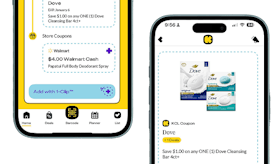


For iOS and Android users.
Get all the new deals and savings hacks straight to your inbox
Will be used in accordance with our Privacy Policy